By Qaisar Roonjha · Published September 17, 2026 · Product information checked September 16, 2026
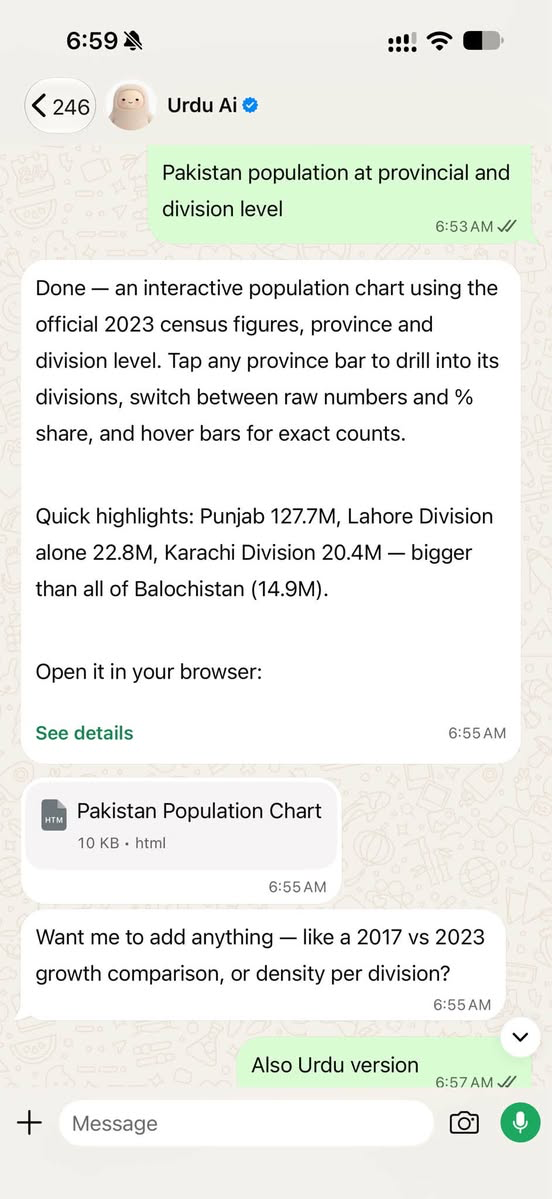
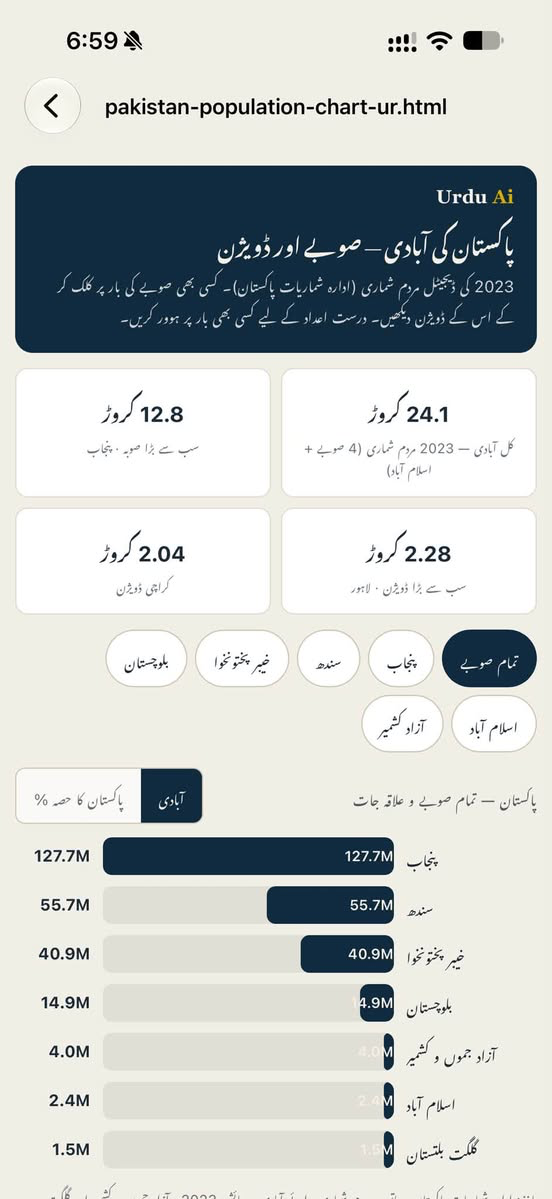
I sent a simple message on WhatsApp asking for an interactive chart of Pakistan’s population at the provincial and division levels. The agent returned an HTML file with a chart, options to explore the data, and a way to switch between population figures and percentage shares. I then asked for an Urdu version.
The experiment continued. I asked it to turn the same information into a PDF, then a podcast, and then a video. I gave these instructions and received the outputs through the same WhatsApp conversation.
That experience made me think seriously about where AI is going. A person can describe a task in ordinary language, follow up with changes, and receive different kinds of work without having to manage every production step themselves.
For me, this is what makes Meta’s Muse interesting. And its availability through WhatsApp could be one of its most consequential features.
What Meta says Muse can do
Meta introduced Muse on September 8, 2026, as a personal AI agent powered by Muse Spark. According to Meta, it operates on a dedicated cloud computer with its own browser, can work across connected services, and can continue longer tasks after the user closes the app. Users can communicate with it through WhatsApp or the Muse app. Meta’s launch announcement
To understand why that matters, consider the difference between receiving advice and delegating work.
A conventional chatbot might explain how to make a population chart. An agent with suitable tools can attempt to collect the information, organize it, write the code, create the file, and return the result. It can then use that work as the starting point for another task.
The distinction is about the workflow. Many AI assistants now combine conversational and agent capabilities, so the boundary is not absolute. The useful question is how much of a task the system can actually carry through, with the access and supervision available to it.
The population-chart workflow
In my population experiment, the conversation became the place where I directed the work. The interactive chart itself was an HTML document opened for viewing. This is an important detail: “through WhatsApp” means WhatsApp served as the communication channel. The finished output could still be a file, a webpage, or another format.
The Urdu version also made the experience more meaningful. An English output can demonstrate technical capability. A readable Urdu interface helps show how that capability might reach people who are more comfortable learning and working in their own language.
For a teacher, the same information could become a classroom handout. For a journalist, it could support an explainer. For a community organization, it could become a presentation or an audio briefing. These are possible applications of the workflow I tested, with each version serving a different audience.
What the screenshots do not verify
There is still an essential editorial responsibility. A polished chart does not prove that the underlying data is correct. Population figures need consistent dates, clearly defined geographic coverage, and traceable sources. If a chart includes territories alongside provinces, it must explain how those figures relate to the national total. Turning an error into a PDF, podcast, and video simply repeats the error in more places.
My experiment demonstrated the convenience of producing several formats. Each output still needs review before publication.
Why the WhatsApp interface matters
What excites me most, however, is the familiar interface.
An ordinary user may have little interest in installing ten applications, learning their menus, comparing AI models, and moving files between services. A shop owner wants a product listed. A teacher wants tomorrow’s lesson prepared. A small media team wants its material organized and ready to review.
For someone already comfortable with WhatsApp, messaging an agent could make these tasks easier to begin. They can describe what they want, send supporting material, and ask for revisions in the same way they already communicate with other people.
This has particular relevance for the audiences I think about in Pakistan. Language, confidence, and unfamiliar software can all make digital work harder to access. A conversational interface can reduce some of that difficulty. People will still need to explain their requirements and judge the results, but they may need less knowledge of the software steps in between.
Muse also has a working environment behind that conversation. Meta’s technical documentation describes a cloud computer that can run code and use a browser, along with connectors for external services. Meta says Muse can also build custom connectors for services with suitable APIs or command-line tools. This helps explain how an agent can move beyond generating text and begin coordinating work across tools. Meta’s technical explanation
That does not mean every website or application will work automatically. A particular workflow depends on the available integration, account permissions, platform restrictions, and whether the agent can complete the steps reliably.
Still, the possibilities are worth exploring.
Possible business workflows to test
Imagine a business owner sending a message: “Put this new item on sale on my website. Use these photographs, follow our usual writing style, and show me the listing before publishing.”
A properly configured agent could potentially prepare the product description, adjust images, fill in relevant website fields, and create a draft for review. The owner would check the price, stock details, claims, and appearance before authorizing publication.
This is a workflow I would want to build and test. It should not be presented as a guaranteed Muse feature for every WordPress installation. But it illustrates the direction: the owner states the business objective, while the agent handles more of the software work.
The same idea applies to a journalist or small media platform. A reporter might send photographs, footage, interview notes, and confirmed facts. An agent could help organize the material, prepare an article draft, suggest captions, and produce versions for different channels. With suitable tools and permissions, the workflow might extend to video preparation, website updates, and scheduling.
Editorial judgment remains central. Someone must verify facts, preserve the meaning of interviews, check names and dates, and decide whether the material is ready to publish. The value would be in reducing repetitive production work so that a small team can spend more attention on reporting and decisions.
My own test involved several media formats, but it is also useful to distinguish Muse the agent from Meta’s media models. Meta separately describes Muse Image and Muse Video as image and video generation models. Their existence should not be taken as proof that every Muse account supports every format, resolution, or export setting. A claim such as universal 4K video generation needs verification for the specific feature being used. Meta’s introduction to Muse Image and Muse Video
Beyond businesses and media, I can imagine people developing smaller, useful routines with an agent:
- A briefing on their professional field, with current source links and publication dates.
- A daily English lesson with an Urdu meaning, examples, and a short exercise.
- A selection of relevant job openings, checked against location and experience requirements.
- Reel ideas shaped around their page’s audience and recent content.
- An explanation of a difficult topic supported by a useful visual.
- A morning plan based on their priorities, calendar, and unfinished work.
These are tasks to configure and test. Recurring delivery requires scheduling support, and personalized updates require access to the relevant information. A useful daily briefing should reflect real priorities and verified information.
This leads to the opportunity I find most compelling: AI agent setup and management could become a substantial professional service.
Buying access to an agent does not automatically give a business a dependable working system. Someone still needs to understand how that business operates, connect the appropriate tools, document its rules, and decide what the agent may do.
A website developer could eventually offer more than a finished website. They could help configure an agent to maintain selected parts of it. A social media professional could build a repeatable process for preparing and reviewing content. An operations consultant could translate a company’s existing procedures into tasks an agent can follow.
The work would involve several practical responsibilities:
- Understanding the job: Identify recurring tasks, required inputs, and the standard for an acceptable result.
- Connecting tools: Give the agent access to the services and files needed for those tasks.
- Writing instructions: Explain brand voice, business rules, approved sources, and standard operating procedures.
- Setting permissions: Define what it can read, draft, change, or publish, and when approval is required.
- Testing and maintaining the workflow: Check real examples, investigate failures, and update the setup as the business changes.
The commercial value would come from making a process reliable. A business will care whether product listings are accurate, drafts arrive on time, and mistakes are caught before customers see them.
This is why I sometimes describe the idea as preparing an “AI employee.” It is a useful analogy for delegation, provided we remember that the system needs defined responsibilities and human accountability. It does not acquire sound judgment simply because we give it access to more tools.
Permissions and human accountability
Permissions are part of good setup. An agent helping with content may need draft access without permission to publish. One helping with email may need to prepare replies while leaving sending to the owner.
Meta describes a separate system called Sentinel that evaluates Muse’s external actions against permissions and can request user approval. Those controls are useful, but Meta also acknowledges that Muse can make mistakes. A successful setup must combine technical controls with clear operating rules and review. How Meta built safety into Muse
Availability also needs to be described accurately. As of September 16, 2026, the official announcement specifies a US rollout. I have seen people discussing access through VPNs, but those reports do not establish official availability in Pakistan. There is no confirmed worldwide launch date in the announcement that supports promising access for everyone “in a few days.” Readers should check the official service for current eligibility. Meta’s rollout information
My suggestion for anyone with access is to begin with one specific task. Choose public information, define the output, ask for sources, and review the result. Then request a revision or another format. This makes it easier to see where the agent saves effort and where it still needs guidance.
The population experiment started with exactly that kind of simple request. What stayed with me was the continuity: one conversation could carry a piece of work from an initial idea into several usable forms.
The more I explore Muse, the more I think the professional opportunity will be in helping people build that continuity around their own work. They will need someone who understands their business well enough to turn a general AI agent into a useful assistant with clear responsibilities.
For a business owner, teacher, journalist, or community organization, the goal is straightforward: describe the work in familiar language, receive something useful, and remain in control of the decisions that matter.